Showing posts with label Optimization. Show all posts

Monday, 14 February 2011

Display both text and image ads for an easy change with big impact

FunCheapSF.com is an online resource for finding free or affordable events in the San Francisco Bay Area. Founder Johnny Hayes recently shared his site’s story with us and gave some tips on an easy and high impact way that he’s optimized his revenue -- by enabling both text and image/rich media ads.

Inside AdSense: How did FunCheapSF.com come about?
Johnny Hayes: I moved to San Francisco without a job and couldn’t find much work, so I had a lot of time on my hands. I spent my time hunting down cheap and free things to do in the city and, starting in 2003, began emailing my friends with a weekly list of activities. More friends found out and wanted to be added to my email list, so I decided it was time to make a real website.

IA: How did you get started with AdSense?
JH: I began using AdSense in March 2007. It was my first source of online advertising revenue. As content developed on my site and traffic grew, my AdSense revenue grew as well.

IA: Why did you decide to opt in to both text and image/rich media ads?
JH: Several months ago, I received an email from AdSense letting me know that I hadn't opted in to displaying text ads and was only displaying image ads.

I had originally chosen to only show image ads because I figured they were more aesthetically appealing to my readers. But Google’s reasoning – which made sense to me – was that even though there’s tons of advertisers using image ads, there’s a bunch more out there who are specifically bidding on text ads. If I’m only showing image ads then I’m leaving the text advertisers out of the auction. And since these text ads would only be shown on my site if they outbid image ads, why not offer this space to them?

So I decided to give the text ads a shot. It seemed like an easy thing to do that might have a positive impact on my revenue with virtually no downside.

IA: What were the results? Would you recommend this strategy to other publishers?
JH: After enabling both text and image ads on my site, I saw a 51% revenue increase and nearly a 60% increase in average eCPM. It was an easy change with a big impact. And using AdSense means I don't have to worry about the laborious task of finding and managing advertisers myself and can instead focus my time on what I like to do – writing good content, putting together a great site and growing my business. I just plugged in the AdSense code and rarely have to think about it again.

I would say to other publishers that it’s worth giving the option for both text and image ads a try. It's pretty easy to set up – I just followed the instructions in the email I had received from AdSense and it took just a few minutes. Also, set up channels to track your ads so you can see specifically which of your ad locations and ad types are monetizing well, and continue with that.

If you want to give text and image ads a try like Johnny, click here to upgrade your units now!
  • Once you're signed in to your AdSense account, click the "My Ads" tab in the new AdSense interface
  • Select all ad units
  • From the "Actions" dropdown, edit ad type to "Text & Image / rich media ads"
  • Set up custom channels to monitor the impact on your AdSense performance
Check out the images below to see where to enable both text and image ads in your account using the new AdSense interface:

Tuesday, 8 February 2011

Join us for an AdSense Optimisation Session in London, UK

On Wednesday, February 16th, two of our optimizers will be in London, where they'll hold 20-minute optimization sessions at a local coffee shop in the afternoon. We’re aiming to keep this session casual, so we can provide one-on-one consultations to as many of you as possible.

We’d love to meet you, so please fill out this form if you’ll be in the London area on February 16th and would like to schedule an appointment with our team. Once we get your RSVP, we'll follow up by email with additional details if there's time available. Scheduling will be done on a first-come, first-served basis, but we’ll do our best to include as many of you as space will allow.

See you in London!

Wednesday, 5 January 2011

Fresh year, fresh start

Welcome to 2011! Though it may be hard to stick to all of your New Year's resolutions (we can’t say no to donuts either) we want to help keep you on track by giving you ten quick and easy AdSense resolutions you can be sure to keep:
  • Enable text and image ads so all available advertisers can bid to appear on your site.
  • Use wider ad units which are more reader-friendly and used by more advertisers
  • Use channels to measure the outcome of any tests you run by grouping and tracking ad units as you choose.
  • Turn those channels into ad placements so advertisers can pick specific groups of ad units on your site that they want to target.
  • Go through the AdSense checklist to learn about new AdSense features and brush up on your program knowledge.
  • Follow us on Twitter to get quick updates on the latest features, AdSense tips, and Google highlights.
  • Join the conversation in the Help Forum to connect with other publishers and get your questions answered.
  • Bookmark our troubleshooter so you can quickly diagnose and fix the issue should ads stop showing on your site.
Over here in AdSense, we have some resolutions of our own to keep. Our top priority is to focus on growing and strengthening our relationships with all of you, our valued publishers. We’re working on ways to make Google’s publisher solutions more seamless and integrated, so you don’t miss any opportunities to maximize revenue and enhance your online content. The recent launch of the new AdSense interface is just the start of what the new year holds for future improvements. We’re constantly innovating and we encourage you to do the same.

We hope these tips help you start the year off with a bang. And treat yourself to a donut with the extra revenue you earn -- we promise not to tell.

Monday, 13 December 2010

‘Tis the season for placement targeting: Don’t forget to optimize

We’d like to share a final holiday reminder about our placement targeting series and summarize the tips we’ve shared over the past few weeks.

1. Make sections of your site available to be targeted directly by AdWords advertisers with ad placements. These easy-to-implement changes will make your website and channels more marketable to advertisers, which in turn will increase your overall earning potential.

2. Market your website with DoubleClick Ad Planner so advertisers can easily locate sites like yours that match their target audiences.

3. Optimize your ad units by enabling both text and image ads, using top-performing ad unit sizes, and placing ads ‘above the fold’ so that they’re immediately visible to your users.

We hope you enjoyed our placement targeting series. Check out the Help Center or watch the video below to learn more.


Happy Holidays!

Tuesday, 7 December 2010

Improve your AdSense implementation for the holidays

The holidays are drawing near. As advertisers try to reach more potential customers, now is the best time to increase ad coverage on the pages of your site.

We want to work with you to help optimize your AdSense implementation, and have provided our top optimization tips below. If you’re interested in trying out some of these suggestions, please sign up before December 15th, 2010. An AdSense optimization specialist will contact you by email or phone to implement the tips you want to try, and we may feature some of you on our Inside AdSense blog!

First, we want to remind you that you're allowed to put three standard AdSense for content ad units, three link units, and two AdSense for search boxes on each page of your site.

Choose the right ad units for your pages.
As a general rule of thumb, wider ad units perform better because they:
  • Are easier for users to read and interact with
  • Allow more ads to be displayed within a unit
  • Are preferred by advertisers designing image or video ads
Also, remember to opt in to display text and image ads, as this increases the pool of advertisers competing to appear on your site.

Improve your AdSense implementation by increasing ad coverage on your site.
  • Put ads on pages that don’t currently have any, as this increases the chances of monetizing your site’s traffic. This is especially true for the high traffic areas of your site.
  • Our data shows that placing ads within the page content or article text, or near the navigational areas of your site, can strongly increase ad performance, since it gives your users relevant ads alongside the great content that they’re used to.
  • Use link units to monetize the smaller areas on your site.
  • Above all: the most effective change you can make is to put at least one ad unit above the fold -- the section of the page users see without scrolling down.
Don’t forget to sign up! We'll then check your site and get back to you.

We look forward to seeing your implementations!

Monday, 1 November 2010

AdSense in Your City is coming to Seattle


Over the summer, we traveled to five cities across the US for our AdSense in Your City program. The first round of roadshows got great reviews from attendees, so we wanted to extend the program to meet more of you and provide publishers in a different part of the country with personalized optimization tips.

On Wednesday, November 10, we’ll be in Seattle for our fall AdSense in Your City adventure. A few of our optimizers will be in town to hold 20-minute optimization sessions at a local coffee shop between 10:00 am and 4:00 pm. We’re going to keep it casual this time around, so we can provide one-on-one consultations to as many of you as possible.

We’d love to meet you, so please fill out this form if you’ll be in the Seattle area on November 10 and would like to schedule an appointment with our team. Once we get your RSVP, we'll follow up via email with additional details if there's still room. Scheduling will be done on a first-come, first-served basis, but we’ll do our best to include as many of you as space will allow.

See you in Seattle!

Wednesday, 27 October 2010

Make the most of your AdSense experience with our new checklist

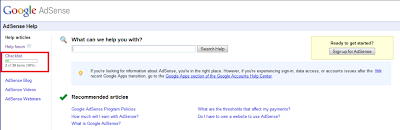
Starting a new program can be overwhelming. What steps should you take to get off on the right foot and make the most of your account? To help you make your way with AdSense, we're delighted to introduce the AdSense Checklist to publishers viewing our U.S. Help Center.


If your language preference is set to U.S. English and you are logged in your Google Account, you'll find the checklist in the left navigation bar of the Help Center. You can recognize it by the progress bar. The checklist is divided into five parts, offering basic recommendations, required steps, and tips to help you grow your account to its full potential.


When you check an item, you'll see the progress bar update accordingly. This will help you in several ways. If you're new to AdSense, you'll get a clear overview of what steps to follow to make the most of your account. If you’re already an experienced AdSense publisher, you'll also have the chance to revisit the basics, and further develop your use of the program.

The progress bar can help you identify quickly how many of the recommended steps you’ve completed, and the checklist will suggest which step you can take next.

We hope that this Help Center feature will be useful to you and help you grow with the AdSense program! If you have other great ideas for ways to help newbies get started with AdSense or thoughts on how to make the checklist even better, join the conversation in our forum.

Monday, 18 October 2010

‘Tis the Season for Placement Targeting: Optimize Your Ad Units


Last week, we discussed DoubleClick Ad Planner, a media planning tool to help you improve your placement targeting. Now that you’ve made your website visible to advertisers with Ad Planner and ad placements, we want to help you ensure that your ad units are also visible to advertisers and ready to be targeted. Here’s how to take advantage of advertiser spend with your ad units:

1. Implement your ad units above the fold and near your content, where users are already engaging with your site. “Above the fold” refers to the area on a page that a user can see without scrolling down.

2. Where possible, use top-performing ad sizes like the medium rectangle (300x250), large rectangle (336x280), leaderboard (728x90), and wide skyscraper (160x600).

3. Enable your ad units to show text and image ads, so that all relevant, available ad inventory is competing to appear on your site. Many advertiser campaigns are made up of image ads, so we highly recommend activating this feature to take full advantage.

Once you've made the changes, not only will your ad placements be ready for this holiday season, but they’ll also be targetable by advertisers in future ad campaigns.

To learn more about these topics, check out our YouTube videos on image ads and high performing ad units, or read more in our Help Center.

Check back next week for more ‘Tis the Season for Placement Targeting tips!

Tuesday, 28 September 2010

Learn AdSense optimization techniques with our new video series

Did you know that a simple change like enabling both text and image ads can boost your eCPM and revenue? Or that a 300x250 medium rectangle typically performs much better in terms of revenue than a 250x250 square? Or that widening an AdSense search box can double the number of queries performed on your site, leading to higher earnings? If you didn’t, don’t sweat it -- the AdSense team and I have come up with a list of six top optimization tips and best practices that can help you earn more quickly.

Many of our publishers’ sites and accounts aren’t fully optimized for AdSense, which means that they’re not earning as much as they potentially could. In these AdSense optimization videos, we walk you through some of the top optimization techniques and explain why they’re helpful in boosting your eCPM and revenue. Incorporating these techniques into your website and AdSense ad layout can help you monetize your traffic like never before!

In the six-part video series, we talk about how to:
  1. Upgrade to high-performing units
  2. Monetize more content
  3. Optimize search box placement
  4. Opt-in to text and image ads
  5. Use link units
  6. Opt-in to placement targeting
Even if you consider yourself an AdSense expert, you’ll probably learn a few new and exciting tips from this series. Take a look at the 'Upgrade to high-performing units' video below, check out all six videos on the official AdSense YouTube channel, and visit our optimization essentials center for more information.


Tuesday, 20 July 2010

Watch our latest webinar recordings

Over the last few months, we held a number of webinars to help you further optimize your site:
  • Optimization Best Practices
  • AdSense for Search
  • AdSense Top Tech Tips
If you haven't seen one yet, you can view the recordings of these events whenever it's convenient for you!

Tuesday, 25 May 2010

Join us for a top tech tips webinar this week

This Wednesday, May 26th at 5pm GMT, we’re hosting a live webinar to share some top tech tips with you.

To register for this webinar, please visit our Help Center.

The topics we’ll cover in this webinar are:
  • How to determine which ad variations perform best for you
  • How to use HTML/CCC to wrap text around ad units
  • How to ensure your best-performing ad units are defined first in your ad code
  • Using Google Analytics to better understand your users and make your ad implementations more effective
  • Using Webmaster Tools to increase the index and rank of your site
Prior to the webinar, you can post your questions on our Google Moderator page and we'll address them during the webinar.

Monday, 17 May 2010

Join us for an AdSense for search webinar this week

We’re hosting a live webinar to share our tops tips on optimizing AdSense for search on Wednesday 19th May at 5pm GMT.

You can register for this webinar through our Help Center.

In this webinar we'll cover:
  • Implementing and customizing AdSense for search
  • Optimizing your search results using AdSense for search performance
  • Improving your search results using keywords
  • Custom Search Engine advanced features
You can already start asking questions related to this topic on our Google Moderator page and we'll do our best to address them during the webinar.

Thursday, 6 May 2010

Live AdSense webinars available in six languages

The AdSense team is hosting a new series of live online webinars this summer. These webinars will focus on AdSense for Search, important technical tips, and best practices for optimizing ad placements, formats and colors on your site. Our first webinar is:
  1. AdSense Optimisation Best Practices
    Wednesday 12th May at 5pm GMT
In this webinar we'll guide you through how you can implement AdSense on your site for optimal results. We'll cover:
  • Optimizing your AdSense for Content implementation by choosing the right placements, ad formats and colour palettes
  • Tracking the results of your changes via channels
  • Improving the user experience and generating additional revenue with AdSense for Search
You can sign up for our webinars through our Help Center. These webinars are also available in German, French, Italian, Spanish and Russian. Just change the language drop-down to see what's available in your market.


Prior to the webinar, you can start asking questions related to this topic and vote on others’ questions in our Google Moderator. We'll answer as many questions as possible during the live event. If you're not familiar with Moderator, please check out our Google Moderator Help.

Monday, 5 April 2010

Webinar recordings now available online

A few weeks ago, we held a few webinars focused on topics such as increasing your revenue with AdSense and taking advantage of another publisher monetization platform, DFP Small Business, to manage the ad space you sell directly. If you missed the live webinars, you can now view this series of optimization webinars through our Help Center, to help you make the most of your AdSense account.

If you are interested in viewing additional webinars, you'll find last year's recordings in our Help Center.

Tuesday, 9 March 2010

Earn more with AdSense tips by email

A few months ago, we updated the email communication options in your AdSense account to give you more choices about the types of messages you'd like to receive from us. You can now pick the types of messages that interest you from five categories:
  • Customized help and performance suggestions
  • Newsletters
  • Google market research
  • Special offers
  • Information about other Google products and services which may be of interest to you
If you'd like to receive emails with optimization tips that are targeted to your specific account settings and ad implementation, you'll need to choose the category Customized help and performance suggestions. You'll receive roughly one email per month from us with targeted performance suggestions, so you don't have to worry about your inbox overflowing with messages from us.


In case you aren’t currently opted into this category, we’d like to recommend that you update your preferences to be able to receive Customized help and performance suggestions going forward and not miss out on valuable information on how to optimize your AdSense performance.

Monday, 1 March 2010

Join us for two live webinars this week

This week, we'll be hosting two live webinars to help you discover how you can make the most of your AdSense account with a detailed understanding of DFP Small Business and AdSense for search.

The DFP Small Business (formerly Google Ad Manager) webinar will take place on Tuesday, March 2nd. This webinar will cover how you can:
  • Use DFP Small Business to sell, schedule, deliver, and measure all of your direct-sold and network-based ad inventory (including AdSense)
  • Have AdSense backfill your directly-sold inventory and compete with your other ad networks
  • Optimize your AdSense placements
The AdSense for search webinar will take place on Wednesday, March 3rd. In this webinar, you'll learn how to:
We encourage you to post your questions in advance of each webinar on our Google Moderator pages for DFP Small Business or AdSense for search.

Sign up for these webinars here! We look forward to seeing you soon.

Tuesday, 16 February 2010

Update on the webinar schedule

We experienced some sound issues when we launched our AdSense Optimization Basics webinar on February 10th. We'd like to apologize to those of you that attended for the inconvenience caused, and let you know that we've rescheduled the event to the same time tomorrow. You can continue to post your questions here and we'll answer as many as possible during the live event.

We hope to see you there.

Tuesday, 22 December 2009

Webinars - out with the old, in with the new

This year, the AdSense team has brought you a series of live webinars covering a range of topics, and we'd like to take this opportunity to thank everyone who attended. We hope that you're already profiting from implementing the tips featured in our webinars.

Your feedback to date has been very helpful, and we'll spend the coming weeks developing brand new, interesting content for 2010. If you haven't already done so, we invite you to share with us the topics you'd like to see covered in future webinars.

We've received great reviews from publishers who've attended our webinars, so if you haven't seen one as yet, you can view the recordings of these events whenever it's convenient for you.

Wishing you a happy holiday season and a healthy new year.

Friday, 4 December 2009

Connect with AdSense via online webinars

We often hear publishers ask for more information about using AdSense most effectively, and so in response, we've initiated a number of free, online webinars. If you haven't yet participated in a webinar, they focus on specific topics such as increasing your revenue with the AdSense program and taking advantage of new features. At the end of each webinar, you can also ask your questions live to our AdSense specialists.

There are still a number of upcoming webinars in 2009, and we encourage you to sign up soon. We've also created a short video about webinars featuring a few members of our Dublin-based team.


Monday, 23 November 2009

A deeper look at channels: Custom channels (Part II of III)

In the second part of our channels series, we'll focus on custom channels. Boyar Naito will walk you through how to set up custom channels to track the performance of specific ad units. You'll learn about the three pieces of information that are most important to us: ad size, ad location, and page content, and how to analyze this information to figure out what ad formats work best for your website.


You can find more information about custom channels in our Help Center. Catch the last part of this series next week, when we'll cover targetable channels.