We’re very excited to announce the launch of our newest blog, the AdSense Arabia blog. Like our other Inside AdSense blogs, it will provide optimization tips, product announcements, and other program information to help our Arab publishers maximize their earnings and make the most out of their Google AdSense accounts.
With the rapidly developing online advertising market in the Middle East & North Africa region, and the growing interest in Google AdSense, we’re thrilled to be taking the next step by introducing this new information platform.
Joining English, French, Italian, German, Spanish, Russian, Dutch, Turkish, Portuguese, Polish, Japanese, Chinese - Traditional, Chinese - Simplified, and Korean, AdSense Arabia blog is our fifteenth Inside AdSense blog worldwide. Check out the navigation sidebar under the header “Related Google Blogs” for links to all of them! We hope to launch additional Inside AdSense blogs in the future so we can continue to reach even more of our global publishers.
Wherever in the world you are, we hope to see you on Inside AdSense!
Showing posts with label googlenew. Show all posts
Showing posts with label googlenew. Show all posts
Friday, 11 February 2011

Wednesday, 12 January 2011
New features now available in the new AdSense interface
Since our post announcing the open beta of the new AdSense interface, we’ve been working on a few additional features, listening closely to your feedback about how we can continue to improve. We’re very excited to announce a few changes that will further enhance your AdSense account management experience:
- We’ve changed the default metrics shown on the Home and Performance reports pages based on strong feedback that most of you prefer to view your earnings at the page level rather than by ad unit. As a result, we’ve switched back to page level metrics, and those of you who wish to see ad unit CTR and other ad unit level metrics can now do so under the Performance reports tab.
- The Allow and block ads drop-down selector, which lets you see your blocking features by product, has been updated to call out the product name. This makes the interface a lot more clear for those of you using multiple products.
- Ad unit impressions and queries have been renamed ‘Ad requests’ to better describe how this statistic is used for AdSense for content, AdSense for search, and other products. An ad request is recorded each time an ad unit on your site requests ads from Google's servers (for content ads) or a search query is made (for search ads). We report an ad request each time a request was sent, even if no ads were returned and public service ads, backup ads, or no ads were displayed instead.
- Based on feedback, we’ve updated the terms found under the Ad types section of your Performance reports to include text, image, rich media, animated image, and flash. Previously, rich media ads were referred to as HTML and animated image was called dynamic image.
- For publishers using our AdSense for games and AdSense for video products, you can now create and edit channels and see reporting for these products. Learn more about AdSense for games and AdSense for video.
Thursday, 16 December 2010
Google Apps welcomes AdSense
Google Apps is Google’s suite of cloud-based messaging and collaboration apps used by over 30 million users in small and large businesses, educational institutions, government agencies, and non-profit organizations around the world. Apps includes products such as Gmail, calendar, documents, spreadsheets and more, specifically optimized for use in organizations.
We recently launched an improvement to Google Apps that made dozens of Google services, including AdSense, available to Apps users for the first time. Before this improvement, Google Apps users had to create a separate account to sign in to AdSense; now, Apps users can access their cloud-based productivity applications along with AdSense using the same account.
For those of you who also have a Google Apps account, we're in the process of finalizing the infrastructure that will allow you to seamlessly transition your existing AdSense account and data over to your Google Apps account. For new users, if your Apps systems administrator has enabled AdSense, you can begin using this services with your existing Apps account at google.com/adsense.
If you haven’t started using Google Apps yet to manage collaboration for your business, learn more about how to lower IT costs and improve productivity at google.com/apps.
For more details, read the complete post on the Google Enterprise blog and follow all the updates on other newly available services for Google Apps users.
We recently launched an improvement to Google Apps that made dozens of Google services, including AdSense, available to Apps users for the first time. Before this improvement, Google Apps users had to create a separate account to sign in to AdSense; now, Apps users can access their cloud-based productivity applications along with AdSense using the same account.
For those of you who also have a Google Apps account, we're in the process of finalizing the infrastructure that will allow you to seamlessly transition your existing AdSense account and data over to your Google Apps account. For new users, if your Apps systems administrator has enabled AdSense, you can begin using this services with your existing Apps account at google.com/adsense.
If you haven’t started using Google Apps yet to manage collaboration for your business, learn more about how to lower IT costs and improve productivity at google.com/apps.
For more details, read the complete post on the Google Enterprise blog and follow all the updates on other newly available services for Google Apps users.
Wednesday, 10 November 2010
Introducing the new AdSense interface, now available globally
Last November we announced that we were starting to test a new interface with a limited group of publishers. Since then, we’ve been focused on adding new features and incorporating feedback from our testers. Today, we’re excited to announce that we’re rolling out the new AdSense interface to all publishers globally. You should now see a “Try the new AdSense interface” link appear in the upper corner of your account. Clicking the link will bring you to the new interface.
Built based on feedback we’ve heard from you, our publishers, the new interface is full of features designed to help you make more money with AdSense. We want to thank you for all the input you’ve given us, and show you some of the ways it’s reflected in the new interface.
You’ve told us that data that helps you better understand your performance is critical to growing your revenue, so we’ve made sure that the new interface gives you more insights.
You can now run even more detailed performance reports by ad type, ad size, ad unit, targeting type, and bid type for total earnings and other metrics, over custom date ranges. You’ll also find graphs of your data on the new Performance reports tab. You can quickly view impressions, clicks, and earnings all in one graph, compare text ad performance to image ad performance, compare date ranges, and easily analyze data to recognize trends.
You’ve continued to let us know that protecting your brand by having control over the ads that run on your site is extremely important, so we’ve improved our ad controls and made them easier to use.
All ad controls are now in one place, on the Allow and block ads tab. Here, you’ll be able to filter ads from specific advertisers, categories, and ad networks. In addition, you’ll notice that we’ve updated the ad review center to make it easier to review and manage ads that have been placement-targeted to your sites. You can now search for ads in the ad review center by ad type, keyword, URL, or ad network, and choose to allow or block them.
You’ve shared with us the need to manage your account more efficiently, so we’ve redesigned the interface to help you complete tasks quickly and easily.
The new interface allows you to quickly see your earnings and payment information, find relevant features, and make changes to your account. It also brings relevant help and other resources, like videos and blog posts, right into the interface, so you can get the information you need without leaving your account.
We encourage you to give the new interface a try. To learn more, check out google.com/ads/newadsense. You’ll find additional videos, including a tour of the new interface, information about new features, and a getting started guide. You can also join the conversation in our Forum to share best practices and discover what other publishers think about the new interface.
Thanks again for all your feedback. We hope you like the new interface!
UPDATED Nov. 11, 2010: All AdSense publishers now have access to the new interface, as our Engineering team was able to speed up the roll out across all accounts.
Built based on feedback we’ve heard from you, our publishers, the new interface is full of features designed to help you make more money with AdSense. We want to thank you for all the input you’ve given us, and show you some of the ways it’s reflected in the new interface.
You’ve told us that data that helps you better understand your performance is critical to growing your revenue, so we’ve made sure that the new interface gives you more insights.
You can now run even more detailed performance reports by ad type, ad size, ad unit, targeting type, and bid type for total earnings and other metrics, over custom date ranges. You’ll also find graphs of your data on the new Performance reports tab. You can quickly view impressions, clicks, and earnings all in one graph, compare text ad performance to image ad performance, compare date ranges, and easily analyze data to recognize trends.
You’ve continued to let us know that protecting your brand by having control over the ads that run on your site is extremely important, so we’ve improved our ad controls and made them easier to use.
All ad controls are now in one place, on the Allow and block ads tab. Here, you’ll be able to filter ads from specific advertisers, categories, and ad networks. In addition, you’ll notice that we’ve updated the ad review center to make it easier to review and manage ads that have been placement-targeted to your sites. You can now search for ads in the ad review center by ad type, keyword, URL, or ad network, and choose to allow or block them.
You’ve shared with us the need to manage your account more efficiently, so we’ve redesigned the interface to help you complete tasks quickly and easily.
The new interface allows you to quickly see your earnings and payment information, find relevant features, and make changes to your account. It also brings relevant help and other resources, like videos and blog posts, right into the interface, so you can get the information you need without leaving your account.
We encourage you to give the new interface a try. To learn more, check out google.com/ads/newadsense. You’ll find additional videos, including a tour of the new interface, information about new features, and a getting started guide. You can also join the conversation in our Forum to share best practices and discover what other publishers think about the new interface.
Thanks again for all your feedback. We hope you like the new interface!
UPDATED Nov. 11, 2010: All AdSense publishers now have access to the new interface, as our Engineering team was able to speed up the roll out across all accounts.
Monday, 4 October 2010
Announcing beta test of expanded category blocking
Last year we launched sensitive category blocking in order to give you more control over the ads that appear on your sites by letting you opt out of receiving ads that fall into potentially sensitive specific categories such as dating, religion, and politics.
Today we’re excited to announce that we’re beginning to test a related new feature called general category blocking with a small group of publishers. General category blocking will allow you to block even more categories of ads from appearing on your site. We’re testing this feature with 170 more specific categories, including finance, travel, job, and automotive. This feature will allow publishers to block up to 50 ad categories from among a broad range of 170 fine grained categories. To help you understand potential changes to your earnings, we’ll provide you with the percentage of your total revenue and total impressions that fall under each category.
General category blocking will initially apply only to ads in English, regardless of the language of the site. We are working on expanding it to other languages in the future.
This feature is available in the new AdSense interface, which is currently in beta and being tested by a limited number of publishers.

Although we're not able to expand this test to additional publishers at this time, we wanted to give you a glimpse into one of the ways we're working to give you even more control over the ads that appear on your site. Over the coming months we’ll be working hard to refine this feature so that we can roll it out more broadly in the future. Please stay tuned to the blog for any updates, and feel free to leave us a comment in the meantime.
Today we’re excited to announce that we’re beginning to test a related new feature called general category blocking with a small group of publishers. General category blocking will allow you to block even more categories of ads from appearing on your site. We’re testing this feature with 170 more specific categories, including finance, travel, job, and automotive. This feature will allow publishers to block up to 50 ad categories from among a broad range of 170 fine grained categories. To help you understand potential changes to your earnings, we’ll provide you with the percentage of your total revenue and total impressions that fall under each category.
General category blocking will initially apply only to ads in English, regardless of the language of the site. We are working on expanding it to other languages in the future.
This feature is available in the new AdSense interface, which is currently in beta and being tested by a limited number of publishers.

Although we're not able to expand this test to additional publishers at this time, we wanted to give you a glimpse into one of the ways we're working to give you even more control over the ads that appear on your site. Over the coming months we’ll be working hard to refine this feature so that we can roll it out more broadly in the future. Please stay tuned to the blog for any updates, and feel free to leave us a comment in the meantime.
Monday, 20 September 2010
Introducing themed ads in Custom Search
Last year, we took a big step forward in improving customization of the look and feel of results by providing plug-n-play themes in the Custom Search Element. This enabled you to choose from among a palette of predefined styles. You can find a style that matches your website and start using search, or further customize the style if you like.
We’re taking themes one step further. Each theme now has ads displayed with a look and feel that match the overall style used for the search results.
The result is harmony between search results and ads, which we think makes for a great user experience. The following screenshots show search results and ads for three different themes: espresso, minimalist and green sky.
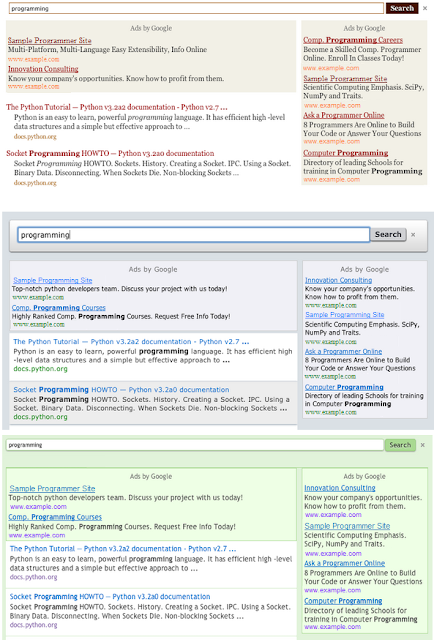
We hope you agree that your visitors will enjoy themed ads. As always, be sure to send us your feedback.
We’re taking themes one step further. Each theme now has ads displayed with a look and feel that match the overall style used for the search results.
The result is harmony between search results and ads, which we think makes for a great user experience. The following screenshots show search results and ads for three different themes: espresso, minimalist and green sky.

We hope you agree that your visitors will enjoy themed ads. As always, be sure to send us your feedback.
Subscribe to:
Posts (Atom)