Showing posts with label New AdSense Interface. Show all posts

Wednesday, 16 February 2011

New Interface Wednesdays: Compare and search performance across multiple date ranges

Have you ever run a test on one of your ad units, and wished you could more easily compare performance from before and after the test? If you've created and saved an ad unit in your account, you'll now find an easy way to do this in your ad units report.
  • Start by visiting the Performance Reports tab and choosing the ad units report (you'll find it in the navigation bar under "Entire account by day").
  • Search for the name of an ad unit you've updated and select it.
  • Open the date range box and set a window of dates before your test -- for example, two weeks.
  • Check the box marked "compare to other dates" and include a similar window of dates after you made the change to your ad unit.
In the graph, you'll then see the performance of your ad unit for both date ranges. You can still toggle the metrics shown on the graph using the radio buttons so you can compare CTR, RPM and other metrics that are relevant to you.


Try it now! Navigate to the new interface and click on the Performance Reports tab, and then ad unit report.

Wednesday, 9 February 2011

New Interface Wednesdays: Quickly view your total earnings

This week we’d like to highlight a few ways that you can view your total earnings. In the past, AdSense reported separately on AdSense for content, AdSense for search, and other AdSense product earnings. You’ve asked for the ability to quickly check your total earnings, and we’re happy to let you know that this is now possible.

If you’d like to focus on the overall sum of your earnings, you can look at the Entire account by day, week, or month reports under More reports. These reports will show you your combined earnings across all products. In future posts, we’ll show you how you can further customize these reports so they make the most sense for your business.

If you’d prefer to see your total account earnings broken out by product in the new interface, you can still do so. By selecting the Products report, you can view earnings from each product you are using as its own line item, as well as the summed, total earnings.


Try it now! Navigate to the new interface and click on the Performance reports tab, and then Products, or More reports, and then Entire account by month.

Wednesday, 2 February 2011

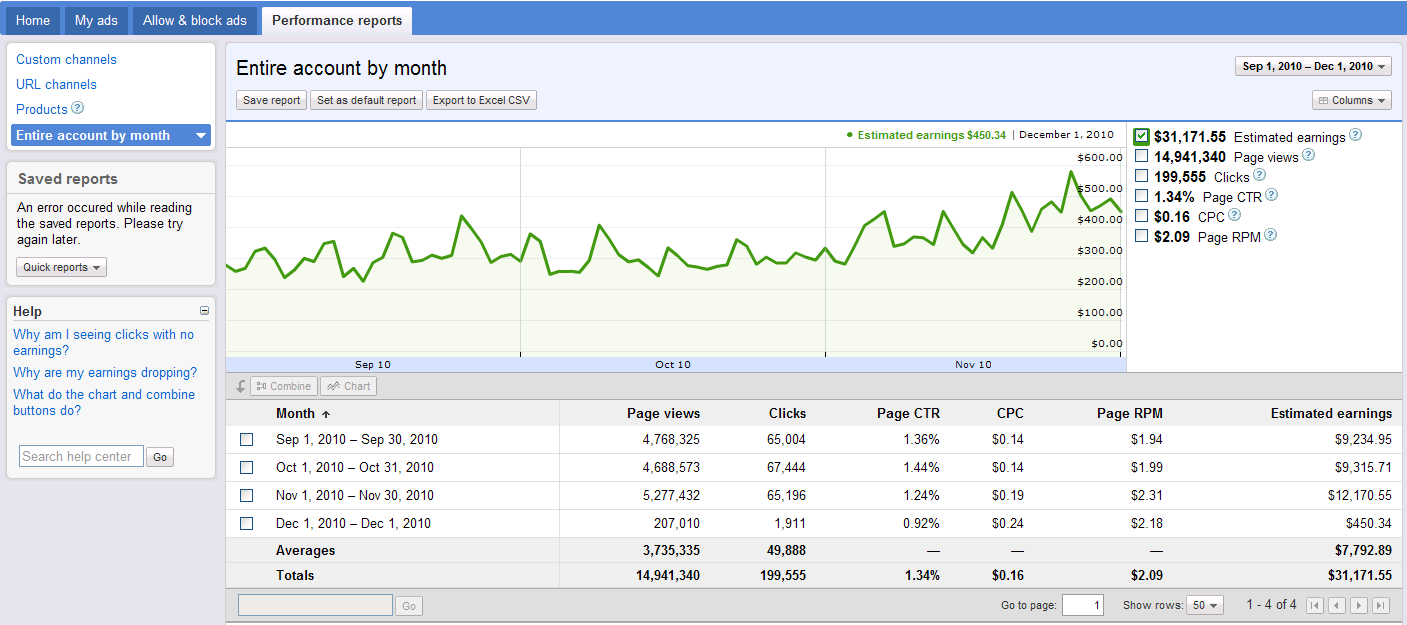
New Interface Wednesdays: Monthly graphs of your account performance

This is the second post in our ‘New Interface Wednesdays’ series. Every Wednesday for the next few months we will highlight something new you can do in the new AdSense interface. From time to time we’ll also share stories directly from publishers who have been using the new interface as well as announce additional features we’ve recently added.

In the next few posts in this series, we’ll focus on different types of reports you can quickly view in the new interface to monitor and gain insight into your ad performance. Today we’re highlighting the ability to quickly view performance by month. We’ve chosen this particular feature because it’s been a top request from publishers, but you can easily do the same by day or week.

Previously, the easiest way to view all account data by month was to export all reports to CSV, then post-process the data in a spreadsheet. Now you can get the same data with just two clicks without leaving your account. On the Performance reports tab, first click on 'More reports,' and then 'Entire account by month.' From here you can see a graph of your earnings. Immediately below the graph, you’ll see data for your account by month. As we mentioned last week, you can easily select the metrics to appear on the graph.


Give it a try today! Navigate to the new interface and click on the Performance reports tab, 'More reports,' and then 'Entire account by month.'

Wednesday, 26 January 2011

New Interface Wednesdays: Graphs right in your account

This is the first post in our ‘New Interface Wednesdays’ series. Every Wednesday for the next few months we'll highlight something new you can do in the new AdSense interface. From time to time, we’ll also share stories directly from publishers who've been using the new interface and announce additional features we’ve recently added.

For our first ‘New Interface Wednesdays’ post, we’d like to highlight the graphical reporting under the Performance Reports tab in the new interface. The new graphs make it easy to see trends in your performance. Rather than scanning rows of numbers, you can view impressions, clicks, and earnings, all in one graph.

Select the metrics you want to see by checking the boxes next to the graph. You can also hover over the graph to get detailed metrics for a specific day, just like in Google Analytics. The graph will appear for just about any type of report you run, making it easy for you to visualize performance. Above the graph, you'll find buttons to save reports that you commonly use and set a report of your choosing to be the default report with a single click. Of course, you can still export the data to a CSV to further process the data in a spreadsheet as well.


If you aren’t yet familiar with the graphs in the new interface, check them out today. Navigate to the new interface and click on the Performance reports tab.

Wednesday, 12 January 2011

New features now available in the new AdSense interface

Since our post announcing the open beta of the new AdSense interface, we’ve been working on a few additional features, listening closely to your feedback about how we can continue to improve. We’re very excited to announce a few changes that will further enhance your AdSense account management experience:
  1. We’ve changed the default metrics shown on the Home and Performance reports pages based on strong feedback that most of you prefer to view your earnings at the page level rather than by ad unit. As a result, we’ve switched back to page level metrics, and those of you who wish to see ad unit CTR and other ad unit level metrics can now do so under the Performance reports tab.
  2. The Allow and block ads drop-down selector, which lets you see your blocking features by product, has been updated to call out the product name. This makes the interface a lot more clear for those of you using multiple products.
  3. Ad unit impressions and queries have been renamed ‘Ad requests’ to better describe how this statistic is used for AdSense for content, AdSense for search, and other products. An ad request is recorded each time an ad unit on your site requests ads from Google's servers (for content ads) or a search query is made (for search ads). We report an ad request each time a request was sent, even if no ads were returned and public service ads, backup ads, or no ads were displayed instead.
  4. Based on feedback, we’ve updated the terms found under the Ad types section of your Performance reports to include text, image, rich media, animated image, and flash. Previously, rich media ads were referred to as HTML and animated image was called dynamic image.
  5. For publishers using our AdSense for games and AdSense for video products, you can now create and edit channels and see reporting for these products. Learn more about AdSense for games and AdSense for video.
Thanks again for all of your great feedback. We’ll let you know as we continue to roll out new features. In the meantime, keep the comments coming on the blog or in this Forum discussion!

Monday, 20 December 2010

The new AdSense interface: Greater efficiency

We’ve given you a tour and covered the greater insight and control that you get with the new AdSense interface, but we couldn’t end the series without a video about the improvements in account management. The new interface lets you find features and make changes to your account more efficiently than ever. You can also get help when and where you need it with relevant help links customized to the content of each page of the interface.


We hope you learned something with our video series and are continuing to enjoy the new AdSense interface!

Monday, 29 November 2010

The new AdSense interface: More controls

Based on your feedback, we’ve worked hard to give you more control over the ads on your site by improving the ad blocking options and making them easier to use. You can now block ads by advertiser URL, block categories of ads from showing on your site, and search and review placement-targeted ads by ad type, keyword, URL, or ad network to easily find, approve, or block ads in the ad review center. The video below provides an overview of these features:


We’ll see you next week for our last video in this series on the new AdSense interface. Don’t forget the popcorn!

Monday, 22 November 2010

The new AdSense interface: More insights

Now that you’ve had some time to dive deeper into the new AdSense interface, we want to be sure that you’re taking advantage of the additional insights at your disposal to help you make smart business decisions. You can now customize graphs and run detailed performance reports to analyze the amount you've made from various ad formats, ad sizes, bid types, and more. Watch this video for additional information:


Stay tuned next week for another video!

Thursday, 18 November 2010

The new AdSense interface: Take the tour

To help you learn more about the new AdSense interface, we’ve created a series of videos that focus on different features and benefits now available to you. Over the next few weeks, we’ll post new videos to the blog to ensure you learn all about the greater insights, control, and efficiency now at your fingertips. Today, we invite you to take a tour of the new AdSense interface. Check out an overview of the improvements we've made and the new features we've added:


If you’d like to start watching the rest of the videos, visit our new AdSense interface YouTube playlist or the video series tab of google.com/ads/newadsense.

Wednesday, 10 November 2010

Introducing the new AdSense interface, now available globally

Last November we announced that we were starting to test a new interface with a limited group of publishers. Since then, we’ve been focused on adding new features and incorporating feedback from our testers. Today, we’re excited to announce that we’re rolling out the new AdSense interface to all publishers globally. You should now see a “Try the new AdSense interface” link appear in the upper corner of your account. Clicking the link will bring you to the new interface.

Built based on feedback we’ve heard from you, our publishers, the new interface is full of features designed to help you make more money with AdSense. We want to thank you for all the input you’ve given us, and show you some of the ways it’s reflected in the new interface.


You’ve told us that data that helps you better understand your performance is critical to growing your revenue, so we’ve made sure that the new interface gives you more insights.
You can now run even more detailed performance reports by ad type, ad size, ad unit, targeting type, and bid type for total earnings and other metrics, over custom date ranges. You’ll also find graphs of your data on the new Performance reports tab. You can quickly view impressions, clicks, and earnings all in one graph, compare text ad performance to image ad performance, compare date ranges, and easily analyze data to recognize trends.

You’ve continued to let us know that protecting your brand by having control over the ads that run on your site is extremely important, so we’ve improved our ad controls and made them easier to use.
All ad controls are now in one place, on the Allow and block ads tab. Here, you’ll be able to filter ads from specific advertisers, categories, and ad networks. In addition, you’ll notice that we’ve updated the ad review center to make it easier to review and manage ads that have been placement-targeted to your sites. You can now search for ads in the ad review center by ad type, keyword, URL, or ad network, and choose to allow or block them.

You’ve shared with us the need to manage your account more efficiently, so we’ve redesigned the interface to help you complete tasks quickly and easily.

The new interface allows you to quickly see your earnings and payment information, find relevant features, and make changes to your account. It also brings relevant help and other resources, like videos and blog posts, right into the interface, so you can get the information you need without leaving your account.

We encourage you to give the new interface a try. To learn more, check out google.com/ads/newadsense. You’ll find additional videos, including a tour of the new interface, information about new features, and a getting started guide. You can also join the conversation in our Forum to share best practices and discover what other publishers think about the new interface.

Thanks again for all your feedback. We hope you like the new interface!

UPDATED Nov. 11, 2010: All AdSense publishers now have access to the new interface, as our Engineering team was able to speed up the roll out across all accounts.